Share history as JSON.
On web and Windows 11, select Raw JSON in Share history for a link containing artist, album, time and location. It is off by default and respects the Time and Location checkboxes.
Keep the songs.
Remember the moment.
Music finds you in everyday places: a café, a shop, a room at home. heard helps you remember what was playing, when you heard it, and optionally where you were.
Start listening once, then let your device check for background music at regular intervals. Recognized songs become a personal history with artwork and links to listen again.
Passive music discovery · You control Start and Stop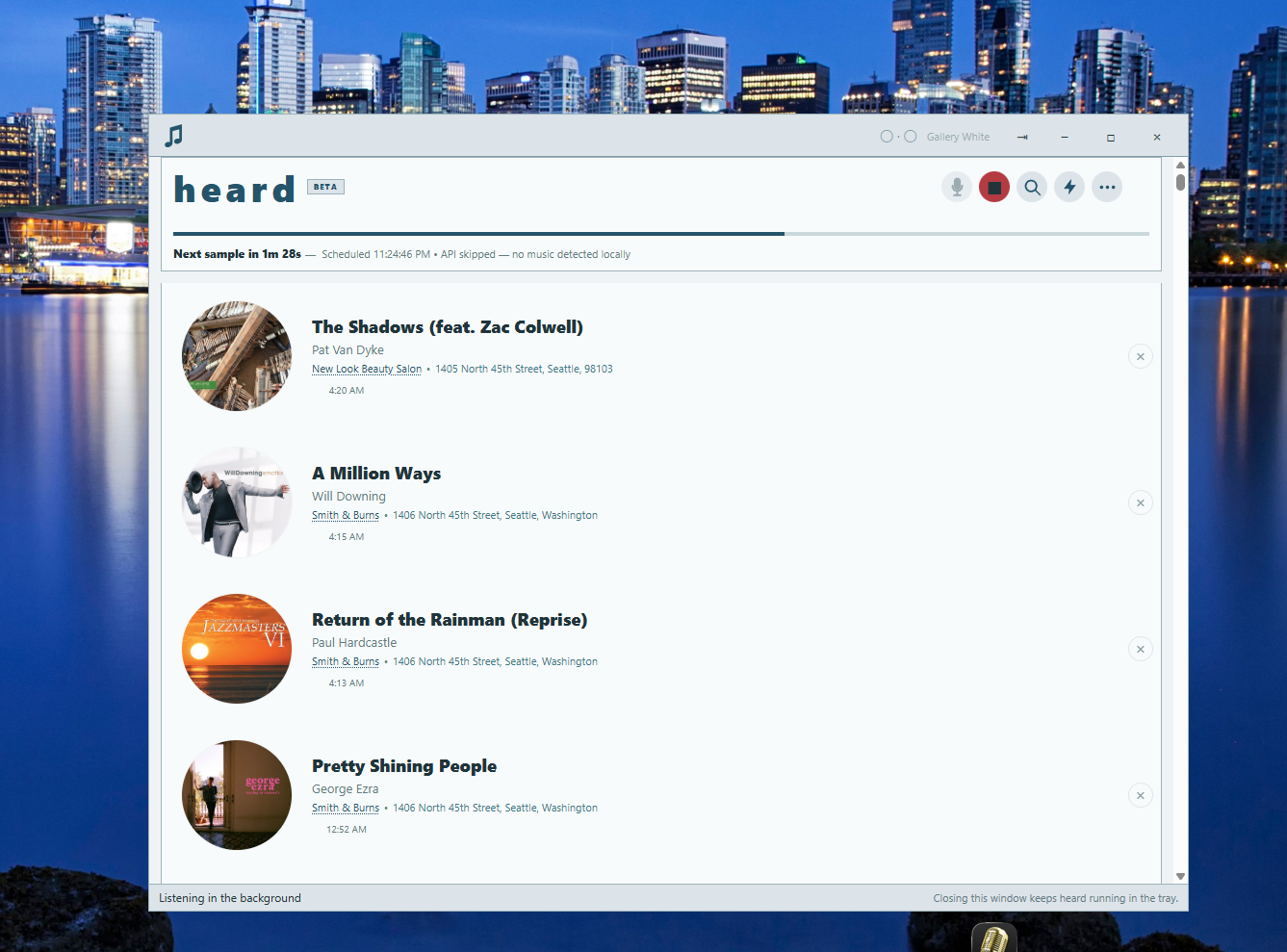
Discover music as you go about your day.
heard focuses on identifying songs playing around your device. There is no need to type lyrics or press a recognition button for every track. While listening is enabled, it takes short microphone samples and attempts to match background music.
The default rhythm is a 10-second sample every two minutes. On Windows, local music screening checks samples before recognition, helping skip quiet or speech-dominated audio. A match adds the song title, artist, artwork, and time to your history. Optional place labels and photos help connect a song with the moment.
Allow microphone access and choose whether to attach location.
Periodic samples look for songs while listening is active. Windows can continue in the tray.
Find a track, open a listening link, or share selected music memories.
Song identification, without a saved audio archive.
heard does not transcribe conversations or save microphone recordings as part of your history. Its purpose is to identify music. The reviewed recognition path processes short samples in memory and stores identification results rather than audio files.
What the microphone captures
A sample can contain nearby voices as well as music. Passing samples are sent to the recognition backend and upstream service. Windows speech screening is a heuristic, so it cannot guarantee that voices are excluded.
What heard keeps
Song history and time; optional location and photos; account/device records, preferences, and diagnostics. These can be personal data. This is not a claim that heard retains no private data or that an upstream provider retains nothing.
You decide when to listen. Use Stop to end sampling, disable location to omit new location capture, and choose explicitly what to share. Windows native listening continues when the window is closed to the tray; use Stop or Exit heard to end it.
Choose how you listen.
Use the website for a quick start, or the Windows 11 companion for native background listening, desktop docking, and notifications.
App functionality
Listening, history, location, photos, and sharing.
Explore guide ↗Location service
Design, API usage, geographic data, and operations.
Explore guide ↗Architecture
Components, data flows, and deployment boundaries.
Explore guide ↗Microphone settings
Understand every control and tune your listening setup.
Explore guide ↗Documentation baseline & original overview
Overview#
heard creates a personal record of music heard around you. It samples microphone audio, identifies songs, and saves a history with artwork, time, and optional location. Nearby businesses, building names, and photos add context to each listening memory.
The product has a responsive browser interface at newdateline.com and a Windows 11 companion. The Windows app adds native microphone capture, system-tray operation, notifications, diagnostics, and a compact right-side desktop dock. Both clients use the same account and backend services.
Typical workflow#
- Open the website or Windows app. Optionally sign in to use account history across devices.
- Allow microphone access, enable location if desired, and select Start.
- Review new song matches in the history. Open a song for music-service links, artwork, location, and photos.
- Correct a nearby place, attach photos, search earlier songs, or create a history share link.
- On Windows, close to the tray or dock the app while native listening continues. Select Stop to stop listening; use Exit heard to quit.
Documentation status#
Feature descriptions correspond to the recovered 7.77 source archive and its release notes. They describe packaged functionality; deployment and installation determine which version a user is running. Native Windows compilation and visual/runtime verification remain pending in the release notes. [S1]
New in heard 7.112.0
- Updated Windows release; expand the changes below for details.
Changes since the previous published version
# heard 7.108

## Native Windows Notification Center only

Removed the independent topmost song-notification window that could overlap the tray/taskbar. Song notifications now request the native Windows banner and corresponding Notification Center entry through Windows App SDK. Native banner display is no longer suppressed in favor of a custom window. Windows manages placement, style, dismissal and Do not disturb behavior.

Album-cover artwork, the native **Open in Spotify** button and click-to-open-song behavior are retained. Cached-cover fallback and local JPEG validation remain enabled. The background “heard is still running” notice also uses the native Windows notification service rather than a tray balloon.

Replaced the former popup-window build test with a native notification payload check. It verifies the actual Windows App SDK-generated XML, local hero image, Spotify protocol action, identification launch arguments, no-art fallback and enabled banner property. It does not display an independent window.

## Install

Extract this ZIP into a fresh folder and run `BUILD-AND-INSTALL-WINDOWS-11.ps1` from PowerShell. The existing normal build/publish/install workflow and installed-version verification are retained. No web deployment is needed for this native update. Identify a new/different song after installing; old Notification Center entries are not rewritten.

In Windows Settings → System → Notifications, keep heard enabled. Windows controls whether banners appear and whether Do not disturb silences them.

Validation: Release/win-x64 app and native notification-checker sources cross-compiled on Linux with Windows resource generation disabled. Existing JavaScript/client regressions, eight Python tests and documentation verification passed. Native payload execution and Windows shell rendering require Windows; the normal Windows build executes the payload check.


# heard 7.109

## Fixed native notification build check

The verifier now runs as `artifacts/win-x64/heard.exe --verify-notifications`, using the published app’s embedded Windows/WinRT activation manifest and bundled runtime. The separate reflection-driven test executable has been removed. Verification calls the actual notification factory and image converter directly, before singleton activation, microphone startup or the normal window. No test notifications are sent.

PowerShell now launches the process with separate redirected stdout/stderr files, waits for its exit code, and appends the complete output to the build log. Windows PowerShell 5.1 can no longer stop at the first stderr line and hide the inner exception. A failure reports its validation stage, exception type, HRESULT, message and full exception chain. A stalled check times out after 60 seconds.

Native Windows banners, Notification Center history, album artwork and the Spotify button remain unchanged. The check still blocks installer publication if it actually fails.

## Install

Extract the ZIP into a fresh folder and run:

```powershell
powershell.exe -NoProfile -ExecutionPolicy Bypass -File .\BUILD-AND-INSTALL-WINDOWS-11.ps1
```

For detailed diagnostics, read `artifacts/notification-check.stderr.log`, `artifacts/notification-check.stdout.log` and `artifacts/build.log`. These logs are generated by the local Windows build. No web deployment is required.

## Validation

Release/win-x64 app sources cross-compiled on Linux with Windows-only resource generation disabled. Existing client/project regressions and eight Python tests passed. Actual WinRT activation and Windows notification rendering cannot be executed on this Linux host; the published apphost check runs during the Windows build.


# heard 7.110

## Lighter borders in Windows song details

The open-song dialog’s inner location panel, music-service links, photo widgets and buttons use softer borders at 35% of the theme border color. The rule is bundled in the native Windows shell and applies across themes. The dialog’s outer frame, focus outlines and shared/error status colors are retained.

Extract into a fresh folder and run `BUILD-AND-INSTALL-WINDOWS-11.ps1` to rebuild/install. This native UI adjustment requires no web deployment. Native Windows Notification Center behavior, artwork and Spotify actions are retained.


# heard 7.111

## Fixed blank native-verifier exit codes

Replaced `Start-Process -PassThru` in the notification check with an owned `System.Diagnostics.Process`. PowerShell can return an empty `ExitCode` for redirected Start-Process objects, causing a successful check to be reported as “failed (exit )”. The new runner retains the process through exit and requires a numeric exit code. A zero result passes; a nonzero result remains an actual verification failure. Missing codes are never treated as success.

Stdout and stderr are drained concurrently, preserving full diagnostics without pipe deadlocks. Timeouts remain explicit and terminate the stalled verifier. The published `heard.exe --verify-notifications` still checks the real native notification payload; verification has not been bypassed. Native Notification Center behavior, artwork, Spotify actions and the lighter song-dialog borders are retained.

## Install

Extract this ZIP into a fresh folder and run:

```powershell
powershell.exe -NoProfile -ExecutionPolicy Bypass -File .\BUILD-AND-INSTALL-WINDOWS-11.ps1
```

The successful check now prints `Native notification check passed (exit 0).` Full output remains in `artifacts/notification-check.stdout.log`, `artifacts/notification-check.stderr.log` and `artifacts/build.log`.

## Validation

The process runner was exercised in PowerShell 7.4.6 on Linux with repeated quick exits, exit 0, exit 7, stderr on success, large simultaneous stdout/stderr, timeout and missing executable cases. Main PowerShell scripts parsed successfully. Existing JavaScript/client regressions and eight Python tests passed. Windows PowerShell 5.1 and Windows notification execution remain to be tested on Windows.

Run the process regression checks on Windows with `powershell.exe -NoProfile -ExecutionPolicy Bypass -File .\tests\native-process.tests.ps1`.


# heard 7.112

## Fixed malformed native notification XML

The detailed Windows error `0xC00CE50D` (“A semi colon character was expected”) identifies malformed XML generated while building the notification. The failing check includes an ampersand/angle-bracket song title and a Spotify URL with multiple query parameters.

Native song and background notification payloads now use `XElement` and `XAttribute` serialization, then pass the completed XML to `AppNotification`. The Windows App SDK string builder is no longer used. Text, alternate text, image paths, launch arguments and Spotify URLs are escaped exactly once; valid Unicode is preserved and XML-invalid control characters are replaced. The Spotify URL and identification activation arguments round-trip unchanged.

Native Windows banners and Notification Center history, one album-cover hero image, Open in Spotify, the lighter open-song widget borders and the reliable process runner are retained. The native verification still checks the same special-character input; no checks have been bypassed.

## Install

Extract into a fresh folder and run:

```powershell
powershell.exe -NoProfile -ExecutionPolicy Bypass -File .\BUILD-AND-INSTALL-WINDOWS-11.ps1
```

No web deployment is needed. The Windows build performs the native notification check inside the published heard.exe before creating/publishing the installer.

## Validation

Production XML-serialization tests passed on .NET 8, including the exact ampersand/title/Spotify-query fixture, Unicode, entity-looking text, artwork paths, activation IDs, missing artwork/actions and invalid XML characters. Cache fallback and Spotify-link tests passed. Release/win-x64 app sources cross-compiled on Linux with Windows resource generation disabled. Existing JavaScript/client regressions passed. Actual Windows notification rendering and WinRT execution still require Windows.